Introduction#
Promote Patch is an XrmToolBox plugin that promotes a patch to the top of the patch list for a given solution. Before I show you how this tool works, let’s start with a use case and why this tool exists.
Use case example#
Let’s assume we have a solution called ‘Contoso Base Solution’ (v1.0.0.0), and two change requests were submitted. We need to work on both CRs in parallel and avoid dependency issues.
Approaches#
There are many ways of going about it:
| Method | Recommendation | Justification |
| Create a single solution for all CRs. | Not Recommended | Creates a messy solution. We cannot deploy components still in development; therefore, when we want to deploy a CR, we need to untangle its components into a new solution. |
| Create a separate solution per CR. | Not Recommended | Creates a messy environment. Any business has a ton of stories/CRs. If we want to deploy to a new env, we have to figure out the bits and pieces of each requirement.
If we want to back up our work, we won’t know where to start. |
| Create a separate solution per CR, and then copy it to a patch of the base solution. | Not Recommended | The team could forget what belongs where unless a naming convention is used. |
| Create patches as required per CR, and then promote whatever patch is ready for deployment. | It works. | If each patch is deployed in order, there is no issue and no workarounds are required.If out of order, then steps are required to resolve the issue described below, which this tool solves. |
Two patches#
To continue our use case, I will go with the last solution in the table above. Let’s create a patch for each CR: ‘Contoso – Change Request 1’ (v1.0.1.0) and ‘Contoso – Change Request 2’ (v1.0.2.0).
When CR 2 is ready, we deploy it.
When CR1 is ready after a while, we will face an issue because CR2 in the target environment has a higher version. Dynamics prevents us from creating a lower version solution in an environment; we can only update it.
One way of resolving this issue is to uninstall CR2 from the target env, install CR1, and then CR2. This is impractical of course.
Another way is to create a new patch in the source env, copy the components to the new patch, and then delete the old one. Now it will be accepted in the target env.
This is exactly what the tool does.
Tool guide#
Install: XrmToolBox.
Usage steps#
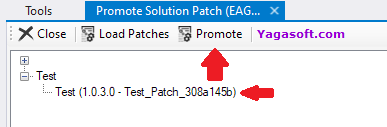
Start ‘Promote Solution Patch’.
Load the patches from CRM.
Select a patch, and then promote it.
Inner logic#
- A new patch is created with a version number higher than all patches of the parent solution.
- Components are retrieved from the old patch, and copied over to the new patch.
- The old patch is deleted.